
Compare the published features of rate-my-art and AI art critique tools, including free access and trials. Where does Drawize Academy fit in, and where is it the wrong choice?
For a simple Google search of “rate my art” you’ll find dozens of free AI powered tools that promise immediate feedback for your art. In this post we compare several tools offering free access or trials, looking at their published features and what they are intended to help with. We built one of these tools and it is included in our review. As always, we are somewhat biased, and I will tell you where we feel our own tool falls short.
This article was first published in July 2026. The available product pages were checked again in September 2026; this is a feature comparison, not a new test of their generated critiques. There is always the chance that new features and changes to pricing will occur and we advise you to check out the individual tools before relying on them.
What separates a useful rating from a compliment machine
We also looked at 5 key questions to help determine whether a rating system would be useful to artists, or just more fluff.
- Is the feedback anchored? Using the phrase ‘Your artwork…’ does not help. It needs to be anchored to specific parts of your artwork in order to give feedback that is useful. (For example: ‘This eye sits lower than that one’)
- Scores with reasons? A feedback system that only gives a score is not much help to improve your art. On the other hand, scores with consistent criteria can help you track improvement, though useful written feedback can do that too.
- Are you paying for “free” feedback? Some art rating sites only provide full, quality feedback after you sign up for a free trial of their paid service.
- What does each tool do with your images? Will your images be used for training models at some point? Most artists care about this and you should find out from the tool in question.
- Does it tell you what to do next? While giving feedback is useful, giving feedback is only half the battle. The best tools for giving feedback will go on to tell you what you can do to practice in order to improve in the future.
ArtHelper — "Rate My Art AI"
ArtHelper offers an art review alongside tools for presenting and selling work. Upload a photo of your artwork and get a written critique including comments on the composition, technique and color. It’s also one of the few AI tools that comments on the commercial ‘marketability’ of your art – of interest to those artists who are looking to sell their art.
Where it falls short for drawing practice: The published review features lean toward finished work and selling it, rather than practicing a drawing skill step by step. ArtHelper also advertises saved report pages and next-step suggestions, so check the particular review and access option you are considering. Best for: Hobby sellers of finished art looking to get a rough idea of how their work might be received by potential buyers.
Writingmate — AI Art Critic
Of the text critics, Writingmate offers a simple upload flow without login. You can drag a picture into the application and within seconds you get written feedback. The application even allows you to select the ‘tone’ of the feedback and it includes a sarcastic option to have your art ‘roasted’.
Weakness for structured practice: The advertised flow centers on a written critique in a chosen tone. It does not describe a step-by-step drawing curriculum. Check its sample critiques to decide whether that kind of feedback helps with your current task. Recommended for: Artists looking for a very quick and totally free second opinion on their finished art, or simply entertainment.
Foundmyself — AI Art Critique
Foundmyself lists a free AI art critique tool alongside its art community. If you want human feedback too, you can look at the community separately; submitting to an AI tool does not guarantee that members will review your work.
What to check: We could not verify the current tool's full output during this update. Check its available examples and access requirements before relying on it. Best for: artists who want human eyes eventually and don’t mind waiting for them.
Coartist — AI Art Feedback (web and mobile)
Coartist advertises structured scores, rating your artwork in terms of composition, use of color, use of value and contrast, use of technique and perspective and use of proportion. It is available for iOS and Android devices, with in-app purchases, and also offers a web studio.
What to check: You can use the web studio without installing an app, but full access and trial terms depend on the plan. Read those terms before starting a subscription. Best for: mobile-first artists who want recurring scored feedback and don’t mind paying for it.
Glima — Drawing Rater
Glima advertises an AI drawing rater covering technique, composition and artistic elements.
What to check: Look at the categories shown before submitting and decide whether they fit the feedback you want. We would not treat an automated creativity rating as a verdict on an artist. Best for: someone exploring general AI commentary, after checking the current access terms.
Drawize Academy — Rate My Sketch (ours)
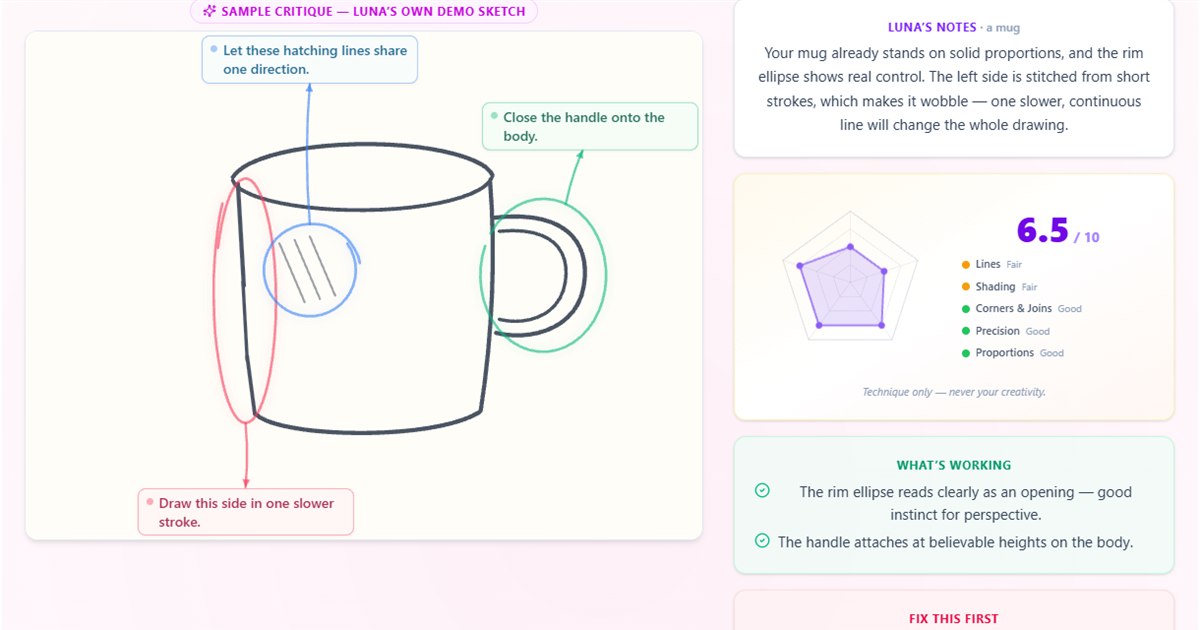
A Few Words About How This Tool Differs. The tool here is designed for sketches and for feedback on technique which you can then use to improve your work. Upload a photo of a pencil sketch, an ink sketch or a marker sketch or draw on the built-in canvas and get feedback on your work. Luna checks five technique areas — lines, shading, corners and joins, precision, proportions — and can add notes on the drawing, a priority adjustment and an exercise. The tool shows your current free allowance and options for additional critiques before submission. You make the drawing changes yourself.
This tool focuses on rating the technique and giving you suggestions on how to improve your work. Therefore, you can upload the reference you drew from for the AI to compare. As for the feedback given by the AI, use the feedback as a prompt to check your work for errors instead of judging the overall quality of your art.
Where it falls short — honestly: If you want a judgment on your finished painting's mood, style or artistic merit, this is the wrong tool. Luna focuses on drawing technique. Best for: beginners and returning hobbyists looking for something specific to practice. Try a free sketch critique and compare the advice with your drawing.
The quick verdict
- Selling your art? ArtHelper emphasizes marketability.
- Zero-friction second opinion? Writingmate.
- Want humans eventually? Foundmyself's community.
- Mobile, scored, subscription? Coartist.
- Learning to draw and want fixable feedback on the drawing itself? Rate My Sketch.
- Drew from a reference or photo and want to know how accurate you were? Rate My Sketch lets you include the reference you drew from for comparison.
One honest caveat about all of these
Just to be clear, no AI tool – including our ratings – is a substitute for a good mentor and more importantly for a feedback loop: get specific feedback, apply one fix, redraw, re-check. And if your question is not “how to rate my art?” but “why do my drawings look so bad?”, read our free guide to the 7 fixable reasons drawings look bad first and then choose one of the reviewed tools to help you close the loop fastest.
Rate your sketch — with reasons, not just a score
Review your sketch within minutes and get a clear verdict. AI reviews your sketch. We provide 5 technique scores and notes that are circled on your sketch. We provide one fix for one aspect of your drawing. We provide one exercise for you to complete in order to improve your skills. If you drew from reference, you can upload the reference and we will check the accuracy of your sketch. AI feedback, with the current free allowance shown in the tool. No sign up is required for the free attempt.
Rate my sketch — free
Tomislav Lombarovic
The Founder of Drawize Academy. Originally creator of the Drawize game, a simple online game which has served over 10 million players.